Build your Financial Fitness
Four simple tools that work together to help you make better spending decisions without judgment.
Spot it
See where your money goes
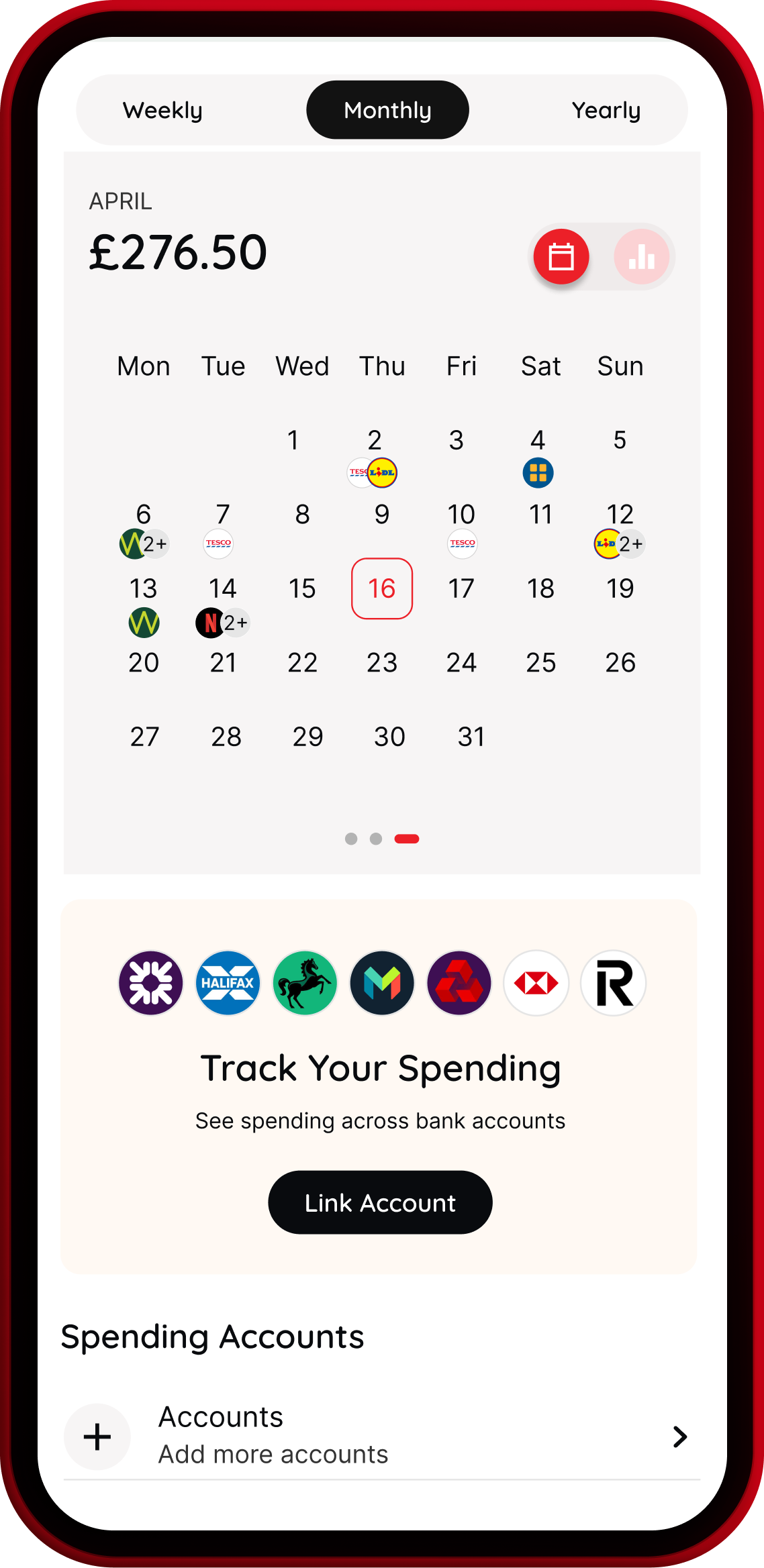
View spending trends, top merchants, and categories over time. For 118 118 Money credit card customers.
Clock it
See prices in hours worked
Convert any price into the hours you'd need to work to earn it. Makes spending feel tangible and personal.
Choose it
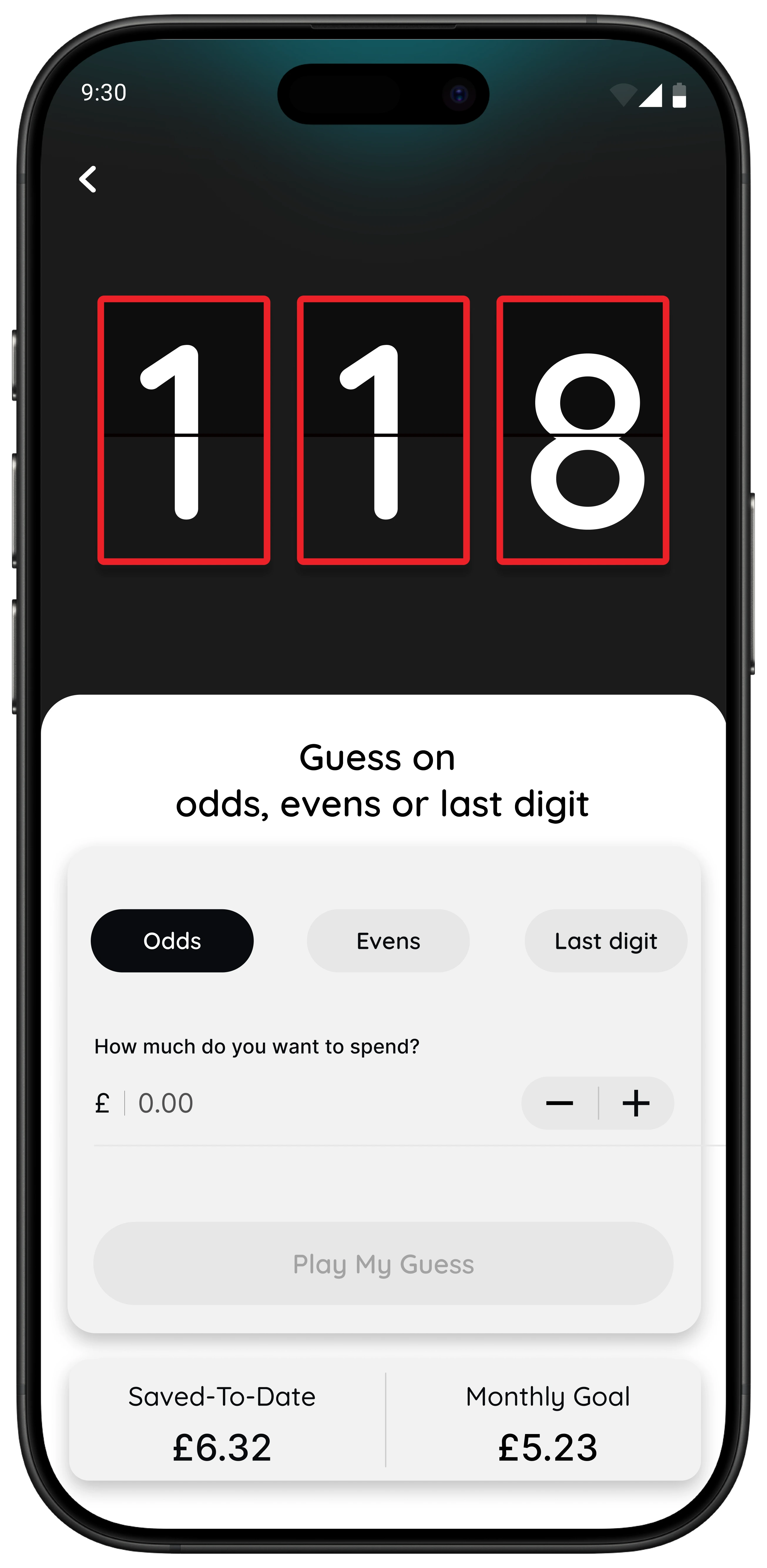
Play the Number Generator
A playful pause to help you reflect. Especially helpful for impulse or peer pressure spends.
Pause it
Sleep on it for 24 hours
Set a 24-hour reminder to create space between impulse and action. Most people feel different the next day.
Spot it
Know where your money goes
For 118 118 Money credit card customers, the Money section gives you a clear overview of your spending patterns.
- ✓ This month vs last month balance and spend
- ✓ Total spend over time (weekly, monthly, yearly)
- ✓ Top spend categories and merchants by value
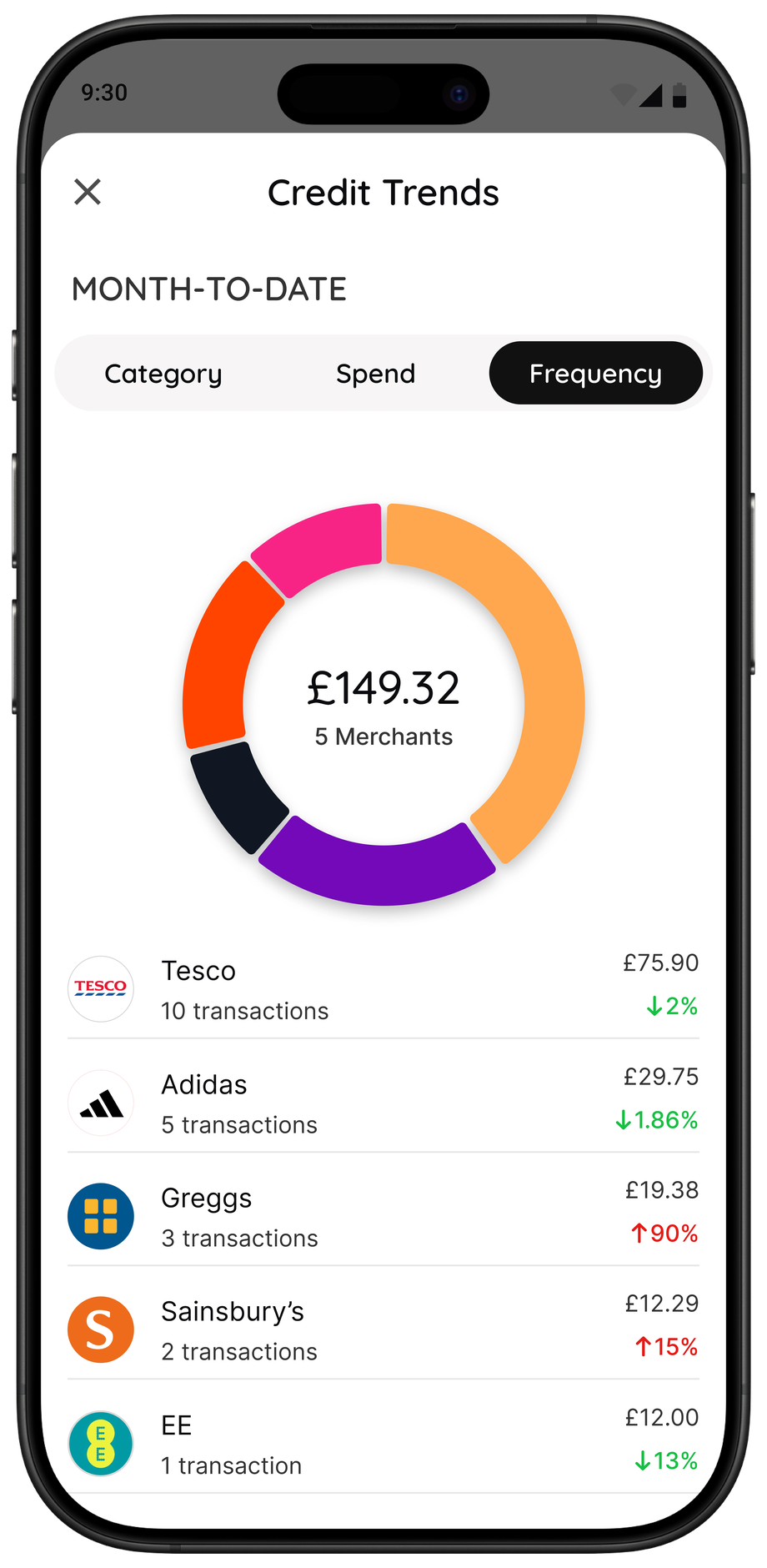
- ✓ Top merchants by visit frequency
- ✓ Changes vs previous period to spot what's moved
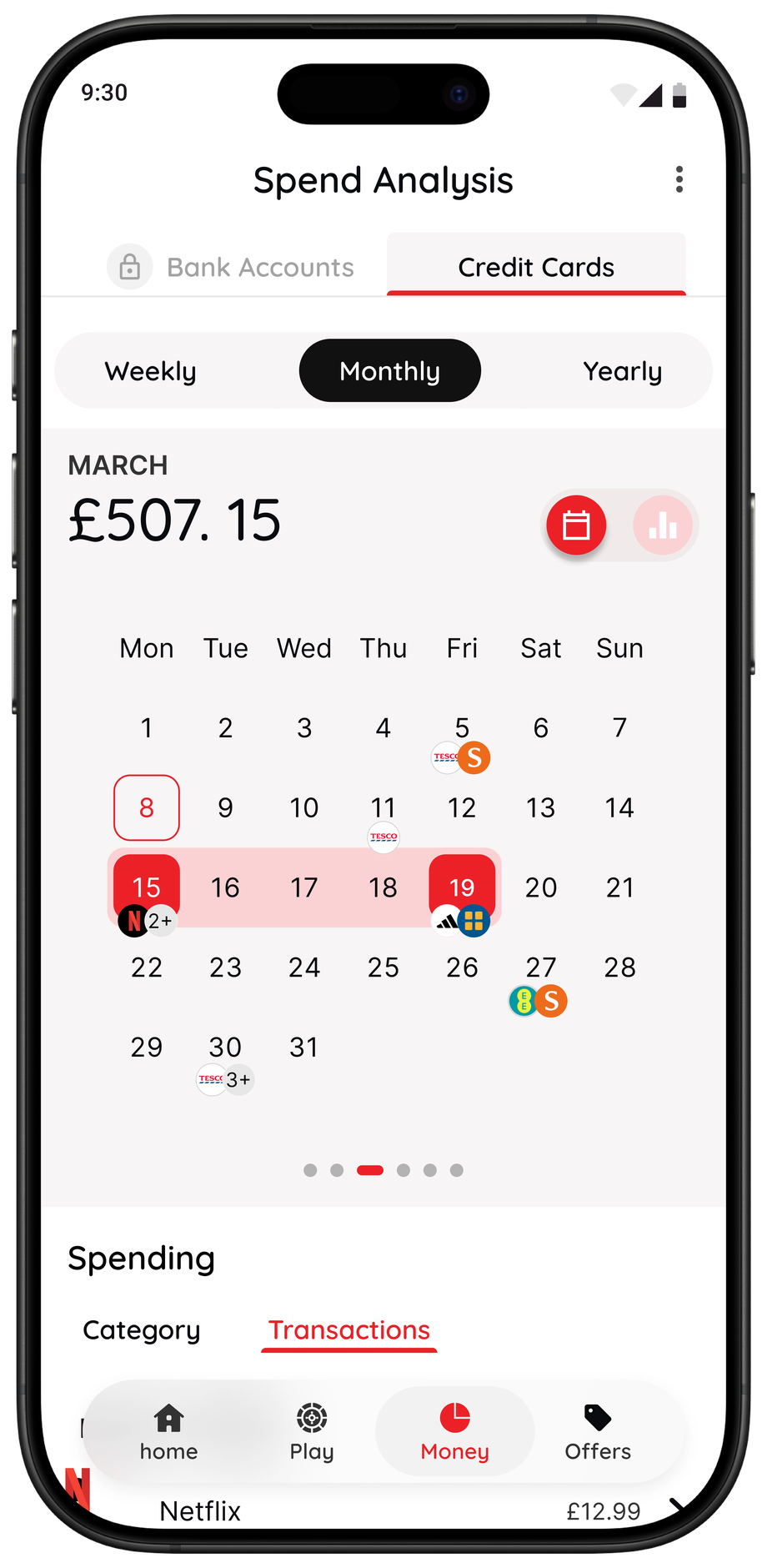
Spending information is updated daily.
Clock it
See prices in hours worked
Turn money into something real — your time — and decide if it's worth it. Try the calculator below or use the Wait game in the app.
Choose it
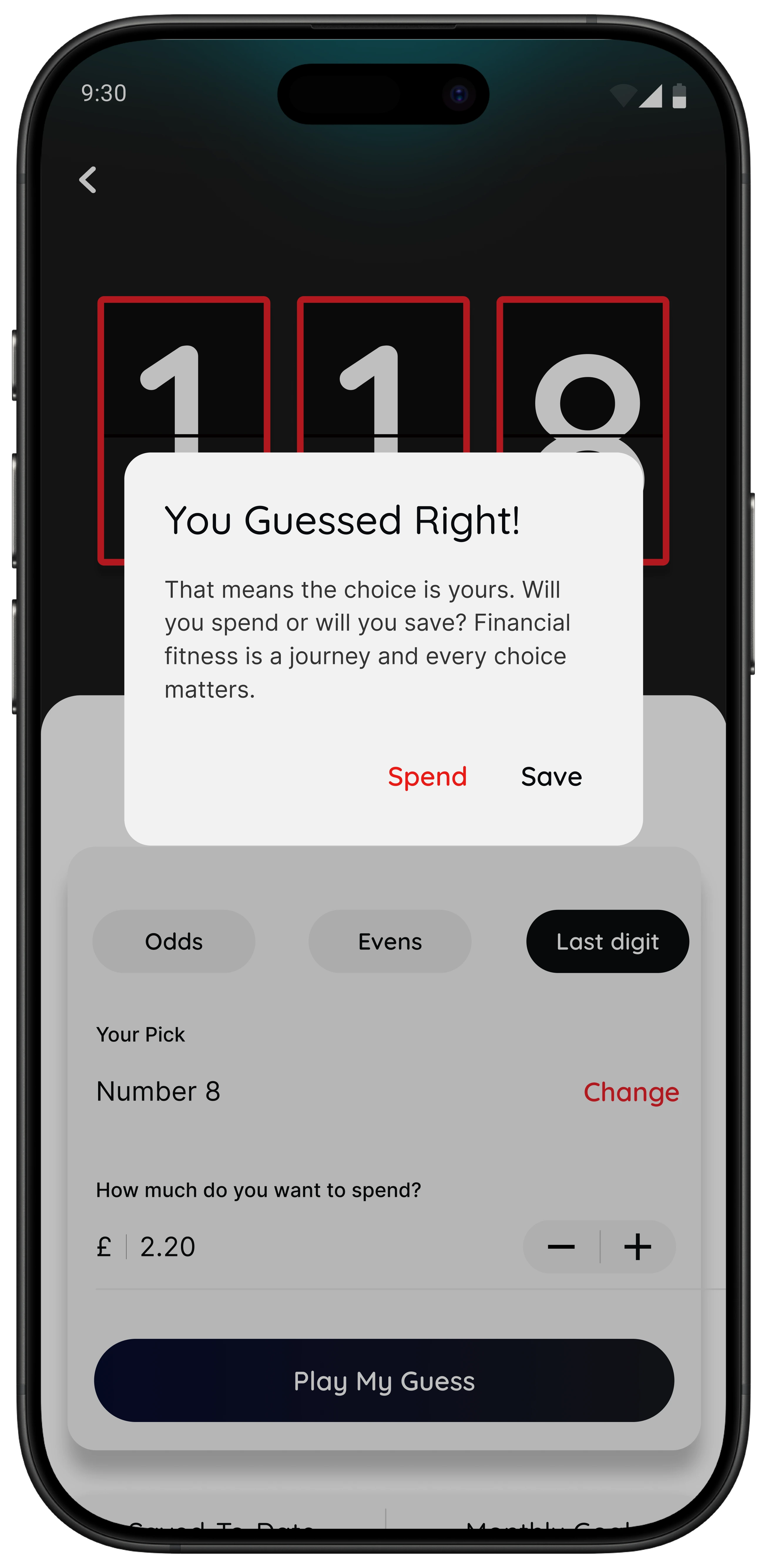
Use the Number Generator to decide
A neutral, playful moment — especially helpful for impulse or peer pressure spends. The game creates a short pause, then you choose what to do.
- 1. Pick odds, evens, or a last digit
- 2. Enter the amount you're about to spend
- 3. Play the game and see the result
- 4. You decide: Buy, Don't Buy, or Sleep on it
The terms "spend" and "save" reflect the game outcome only. No money is moved. Any decision is entirely up to you.
Pause it
Sleep on it for 24 hours
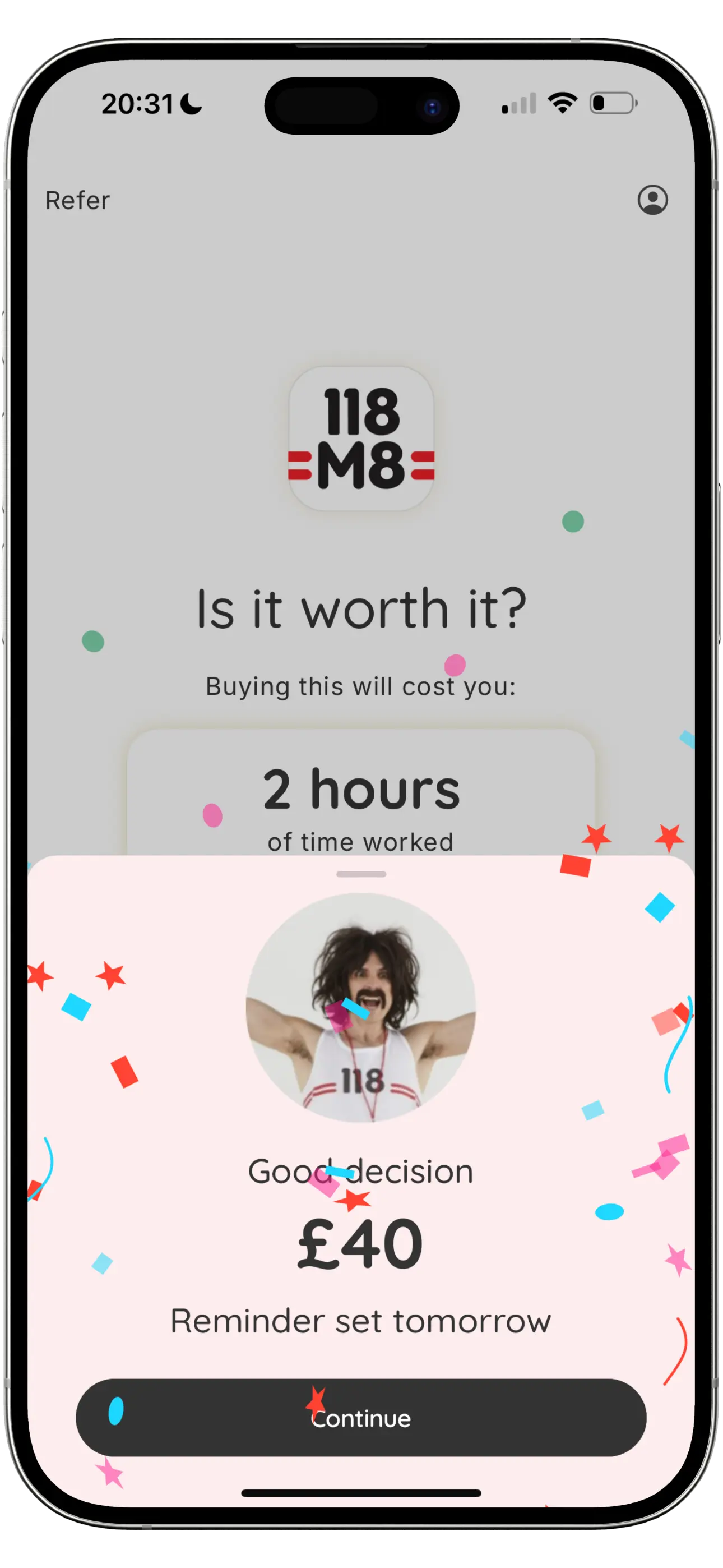
Tap “Sleep On It” instead of “Buy” and 118M8 sets a 24-hour reminder. Tomorrow, you'll see what you nearly bought and how much time you saved. Then you can decide whether that purchase feels worth it or not.
Pause first, decide later. Most people feel different after giving themselves a night to think.
Tip: Use “Sleep on it” whenever an impulse strikes. Future you will thank present you.
Future features
Open banking insights
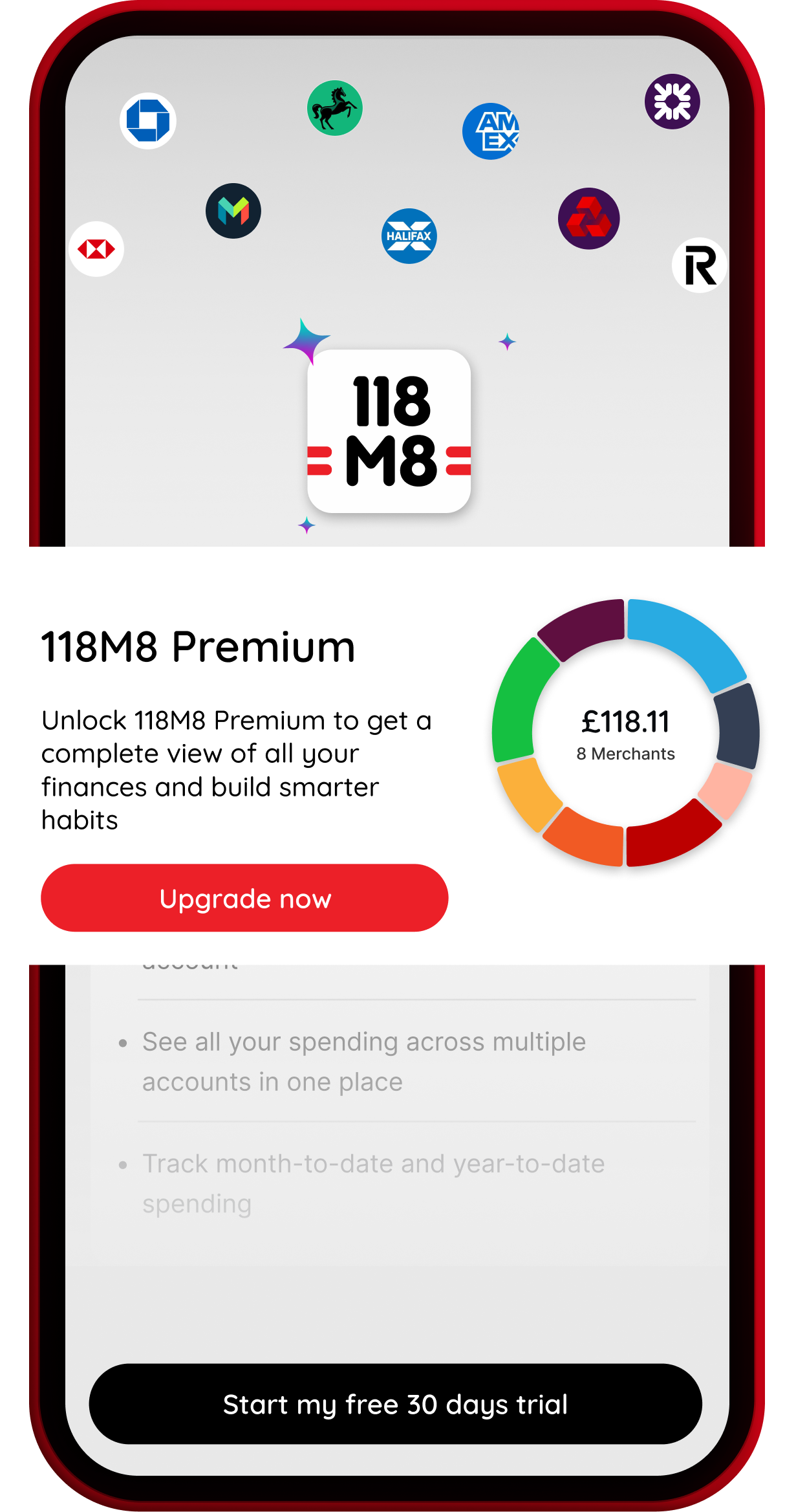
Link other bank accounts and credit cards you choose to share, giving you spending insights across more of your everyday spending.
Spending alerts
Gentle nudges to help you stay aware of unplanned spending patterns.
Credit score checks
Tools for 118 118 Money customers to check their credit progress and stay financially fit.
Rewards & offers
Promotions and offers exclusively for 118 118 Money customers.
You already know 118 118 Money
Now say hello to 118M8, your financial fitness mate that helps you spend your money on the things that really matter. It's about empowering yourself, not depriving yourself.
See what our customers love about 118 118 Money on Trustpilot.Watch 118M8 in action
FAQs
What is 118M8?
118M8 is your financial fitness mate, designed to help you build smarter spending habits. The app includes a range of simple games that encourage you to pause and reflect on spending decisions in different ways. This includes the Wait game, which shows how long you'd need to work to afford something so you can decide if it feels worth it, and a Number Generator game that introduces an element of chance to prompt reflection or Pause before making a purchase.
For credit card customers, the app also provides helpful spending insights, including an overview of recent spending, spending trends over time, top merchants by total spend and visit frequency, and spending by category. Together, these features are designed to help users better understand their habits and make more informed spending decisions.
How do I use the app?
The more you use 118M8, the more useful it becomes. Make it a daily habit by playing a quick game each time you're about to spend — it's designed to help you pause and think before purchasing. If you're a 118 118 Money credit card customer, you can also use the Money section to spot spending trends over time, see your top merchants and categories, and view how often you're spending with certain brands through frequency insights (for example, noticing you've been to the same coffee shop 15 times in a month). This can help you build awareness of where your money is going and identify small changes that may reduce unnecessary spending and free up money for what matters most to you.
In future releases, you'll also be able to link other bank accounts and credit cards you choose to share, giving you the same insights across more of your everyday spending.
Do I need to create an account?
No, you can start playing straight away, however, if you delete the app, you will lose your history. But if you register, then we will be able to save your history and allow you to unlock new features as we release them. Save your progress, track your goals, and share wins with friends.
Does a 118 118 Money credit card customer need to create a new account?
No. If you are a 118118 Money credit card customer, then just can log in with your 118 118 Money credit card Mobile app credentials and immediately see your spending trends from last year. Also, you can start playing straight away. Save your progress, track your goals, and share wins with friends.
How do I set or change my savings goal?
Just tap "Set Goal" and choose your target whether it's a weekend away or just a rainy-day fund. You can edit or reset it anytime.
What happens when I hit my goal?
You'll get a well-deserved celebration screen (and bragging rights). Share your win, feel good about your progress, then set your next target.
Can I see how much I've saved overall?
Yes, your game centre screen shows total amount Saved-To-Date. It's your personal proof that small daily decisions add up to big wins.
Note, Saved-to-Date shows the amount you could have chosen not to spend during the current month, based on your in-game decisions. No funds are moved from your bank account.
How do I track my savings?
Every time you don't spend, 118M8 adds that amount to what we call your savings tracker. You can see how close you are to your goal and share milestones like "I've achieved my target of £50 saved". Savings will only happen if you decide not to buy the item and then do not spend that money on something else later.
Can I share my savings on social media?
Absolutely. 118M8 makes it easy to share your wins with friends like how many hours you've saved or how much closer you are to your goal. You're not bragging, you're inspiring.
Why should I share my progress?
Because saving feels even better when it's contagious. Every shared win motivates someone else to think before they spend.
How do I use the Wait game?
Simple. Enter how much you earn per hour, per month or per year and what you're about to spend. 118M8 will instantly show you what that spend really costs in hours of work. You choose: Buy, Don't Buy, or Sleep on It.
How accurate is the time to work calculation?
The app uses the hourly, monthly or yearly rate you enter to calculate how long you'd need to work to earn that amount. It's simple maths, not finance advice. But it's a great way to see the real cost of your spending habits and give yourself 24 hours to decide if you would rather spend those hours on something you want more.
Should I enter my gross or net income?
It's up to you. You could enter your net (take home) income (what actually lands in your account after tax, pension, and deductions). That way, 118M8 can show you the real cost of spending in hours you actually work for yourself, not the taxman. Or just enter your hourly, monthly or yearly pay to get started faster.
What's the “Sleep on it” reminder?
It's your control superpower. Tap "Sleep on it" instead of "Buy" and 118M8 will remind you in 24 hours. If you still want it tomorrow, fine. But most people don't.
What does “Slept On It” mean?
It's the nudge you get the next day after you've set a "Sleep on it" reminder. You'll see what you nearly bought and how much time you just saved by not doing it. That gives you a chance to spend on something you want more instead.
How do I update my hourly, monthly or yearly rate or settings?
Tap Games from nav bar and select > next to Monthly Goal and edit your info anytime.
How does the Number Generator game work?
You choose a number or a range (evens or odds) and play the game. Based on the outcome, the game will prompt you to either spend or save. The result is designed to create a moment of reflection, not to make the decision for you.
What does “spend” or “save” mean in the game?
The terms "spend" and "save" reflect the outcome of the game only. They do not move, hold, or save any money, and no action is taken automatically. Any decision to spend or not spend is entirely up to you.
How can I invite friends to use 118M8?
Go to the "Refer" section. Tap the invite link, send it via message or social media, and help someone else start buying back their time.
What does the credit statement change section tell me?
The credit card statement change section displays your last two statement balances and how the balance has changed between the two statements.
What does “monthly change” mean?
Monthly change shows how your last statement balance compares to your statement balance from the previous month. It helps you see whether your balance has increased or decreased over time.
What does the percentage change mean?
The percentage indicates how much your statement balance has changed compared to last month. A decrease means your balance is lower than last month, while an increase means it is higher.
Why is my balance lower or higher than last month?
Your statement balance can change for several reasons, including spending, payments made, refunds, or when transactions are processed. Viewing your activity over time can help you understand these changes.
What do the bars labelled “This month” and “Last month” show?
These bars provide a visual comparison of your most recent statement balance versus previous month's statement, making it easier to see changes at a glance.
What should I do if my credit statement change section looks incorrect?
At the moment, the app only shows credit card information for 118 118 Money credit card customers. This information is pulled directly from your 118 118 Money credit card statement each month. If you don't recognise a transaction, please check whether it could relate to a recent purchase or subscription. If it still looks unfamiliar, contact our customer support team Contact Us and we'll help investigate.
In the future, you'll be able to link other bank accounts or credit cards that you choose to share with us. If you believe information is incorrect for a linked card that isn't provided by 118 118 Money, you'll need to contact the relevant card or bank provider directly.
Is the credit statement change section updated real time?
The credit statement change section is based on your most recent statement and your last statement. This section will update as soon as a new statement is available, and the amounts will change based on the new statement balance.
What can I see in the Money section of the app?
The Money section provides a clear overview of how you spend your money. You can view your spending weekly, monthly, or yearly, making it easy to compare recent activity or see how your spending has changed over time. This section highlights your top spends, where you spend the most frequently, how your spending is grouped by category, and common spending trends. The information is designed to help you quickly understand your spending patterns at a glance.
At this time, the Money section only shows data for 118 118 Money credit card customers. In a future release, you'll be able to link other bank accounts or credit cards that you choose to share with us, and the same insights and visuals will be available for those linked accounts.
How often is my spending information updated?
Your spending information is updated daily.
Why does my spend look different week to week or month to month?
Spending can vary depending on when transactions are made and when they are processed. Weekly, monthly, and yearly views are provided to help you spot trends over different time periods.
What are spending categories?
Categories group similar types of spending together, such as groceries, eating out, transport, or utilities. This helps you see where your money is being spent across different areas.
Can I change or correct a category?
At this time, categories are generated automatically and can't be manually changed.
What does “Credit Trends” mean?
Credit Trends show how your spending changes over time, such as increases or decreases by category. This is intended to help you understand patterns in your spending, not to assess whether spending is good or bad.
What does the Frequency view show?
The Frequency view shows how often you've spent with each merchant during the selected period, regardless of the amount spent. This helps highlight repeat or regular spending.
Example:
Your Frequency view might show that you visited Starbucks 15 times this month, even if each individual spend was small.
What does the Category view show?
The Category view groups your spending into categories such as groceries, eating out, utilities, or transport. This helps you see which types of spending make up the largest share of your total spend.
Example:
You might see that Eating Out & Going Out accounts for 20% of your spending this month, while Groceries & Household makes up 15%.
What does the Spend view show?
The Spend view shows which individual merchants you've spent the most with during the selected period, based on total amount spent.
Example:
You might see that you spent £120 with Octopus Energy this month, making it one of your top spending merchants.
What do the percentages next to merchants or categories mean?
Percentages show how spending or transaction frequency has changed compared to the previous period. An increase means higher spend or more transactions, while a decrease means less or fewer.
What are “Top Spends”?
Top Spends highlight merchants where you've spent the most during the selected period. This can help you quickly see where larger amounts of your spending are going.
Why do I see the same merchant more than once?
Some merchants operate under different names or payment references, which can cause them to appear separately.
Why does a merchant name look unfamiliar?
Merchant names come from the payment reference used at the point of sale. This may differ from the brand name you recognise.
Why doesn't my total spend match my statement exactly?
Your statement reflects completed billing periods, while the 118 118 Money credit card Mobile app shows real-time and recent activity. Timing differences or pending transactions can cause temporary differences.
What should I do if I don't recognise a transaction?
At the moment, the app only shows transaction data for your 118 118 Money credit card. If you don't recognise a transaction on your 118 118 Money credit card, please check whether it could relate to a recent purchase or subscription. If it still looks unfamiliar, contact our customer support team Contact Us and we'll help investigate.
In the future, when you're able to link other bank accounts or credit cards, any queries about transactions on those linked accounts will need to be raised directly with the relevant bank or card provider.
Does the app tell me how I should spend my money?
No. The app provides information and insights to help you understand your spending. It does not give financial advice or tell you what decisions to make.
Can I use this information to help manage my credit card?
Many customers find that seeing spending trends and categories helps them feel more in control. How you use the information is always up to you.
What if I need more help understanding my spending?
If you need further help, you can contact our customer support team Contact Us, who will be happy to talk through your account with you.
I forgot my login details what should I do?
If you registered, tap "Forgot Password" on the login screen and follow the reset steps. If you use the app without an account, no login's needed.
Is my data safe?
Absolutely. We only store the minimum data needed to make the app work. We only share your personal information in strict accordance with our Privacy Policy, ensuring your data remains protected at every step.
Is this about guilt tripping me for spending?
Not at all. 118M8 isn't here to judge, it's here to empower. It just helps you see the true cost of your choices, so you can spend on what actually matters to you.
What if I actually want to buy something?
Then buy it guilt free. The point is to make conscious choices, not to say "no" to everything.
What's the best way to use 118M8?
Before you buy anything, open the app and see what that cost equals in hours worked. If it's worth your time, go ahead. If not hit "Don't Buy" and add it to your savings tracker.
What should I do if I no longer want my 118M8 account?
If you decide that you no longer want your 118M8 account, you can request its closure at any time. Simply send an email to beta@118m8.com from the email address registered to your account. Our team will guide you through the next steps and confirm once your account has been closed.
How do I manage my marketing preferences?
If you'd like to update how 118 118 Money contacts you, simply send your request to beta@118m8.com. Please include your name and the email address linked to your 118M8 account so we can process the update quickly.