


Snoop App Review: Is It Right for You?
If you are searching for a Snoop app review, you probably want more than a star rating. You want to know what Snoop is actually good at, where it can feel less helpful, and whether it fits the way you make money decisions in real life. This UK-focused review covers core features, bank syncing, alerts, strengths, tradeoffs, and when 118M8 is the better choice if your biggest struggle is impulse spending in the moment.

Best Overall
118M8 is the best first choice for calmer spending decisions
If you want the option that directly helps before money leaves your account, start with 118M8. Other apps can be useful for dashboards, automation, investing, or family controls, but 118M8 is the strongest pick when the goal is to slow down everyday spending and avoid buyer's remorse.
Get 118M8Quick Answer
Snoop is strong for visibility and nudges, less strong for in-the-moment purchase control
If you want one app to pull your accounts together, show spending patterns, flag subscriptions, and surface money-saving prompts, Snoop is a credible UK option. If you already know where your money goes but still buy on impulse at checkout, it may not solve the problem you care about most.
- Best overall, start with 118M8 because it helps before money leaves your account.
- Best for: people who want spending insight, bill awareness, and light-touch money management.
- Less ideal for: people who need a pause tool right before they buy.
- Worth checking: whether you are happy linking accounts through open banking, because that is central to the Snoop experience.
What Snoop does
Snoop describes itself as a money management app that helps you connect your bank accounts, track spending, set budgets, monitor bills, and find ways to save money. On its website, Snoop says you need to connect at least one bank or credit card account to use the app, and that it supports the large UK banks with more accounts being added over time.
That makes Snoop a practical fit for people who want a clearer picture of their finances without building a spreadsheet or manually logging every transaction. The core value is not that it magically changes your habits. The value is that it makes patterns easier to see.
In practical terms, a good Snoop app review should start here: Snoop is mainly a visibility app, not a purchase-decision app. That distinction matters, because a lot of people search for budgeting help when what they really need is a way to slow down the moment they are about to spend.

If you want a broader shortlist before you choose, see Best Apps for Saving Money UK and Apps to Help Save Money.
Core Snoop features that matter most
Snoop’s feature set is easiest to understand when you split it into four jobs: seeing your accounts together, spotting patterns, getting alerts, and finding potential savings.
1. Account syncing and money dashboard
Snoop says it uses open banking to connect your current accounts, credit cards, and other supported accounts so you can see information in one place. For many users, this is the main reason to try it. It reduces the effort of checking multiple apps and can make your month feel less fragmented.
If your finances are spread across more than one account, that convenience is real. Seeing balances, recent transactions, and categories together often gives you the first honest view of where your money is actually going.
2. Spending analysis and categories
On its website and app listings, Snoop highlights spending analysis, category tracking, transaction search, and cash-flow monitoring. This is where the app earns its place for people who want a calmer overview of daily money movement.
Good analysis does not need to be dramatic. It just needs to answer useful questions quickly: what am I spending most on, what has changed, and what keeps repeating?
3. Alerts, prompts, and reminders
Snoop promotes daily alerts, bill warnings, and money-saving suggestions. Its App Store listing specifically highlights alerts that warn if the app thinks you may not have enough cash to cover upcoming bills, based on connected accounts and confirmed income and bills.
That can be genuinely useful if your biggest stress is avoiding accidental overdrafts, missed bills, or spending drift across the month.
Snoop Plus extras
Snoop Plus adds features such as spending alerts, refund tracking, payday-to-payday views, unlimited custom categories, custom reports, transaction export, and net worth tracking. Those extras make the app more appealing for people who want deeper monitoring without moving to a fully hands-on budgeting system.
Snoop Feature Snapshot
| Area | What Snoop offers | Best fit for |
|---|---|---|
| Bank syncing | Open banking account connections and combined dashboard | people with multiple UK accounts who want one view |
| Spending insights | categories, transaction search, trend views, cash-flow monitoring | people asking where the money goes |
| Alerts | bill warnings, daily prompts, savings suggestions | people who benefit from gentle reminders |
| Snoop Plus | spending alerts, refund tracking, custom reports, net worth and more | people who want richer visibility and reporting |
Features can change, so use this as a practical summary and confirm details in Snoop’s current listings before deciding.
How Snoop bank syncing works, and what to think about before you connect
Snoop explains that it connects accounts through open banking rather than asking for your bank password. It also says you control which services get access and can change your mind later. Open Banking Limited explains that UK open banking is permission-based and allows people to share account information securely with authorised third-party providers.
For many readers, that will be enough reassurance. For others, account linking is still a real emotional hurdle. Neither reaction is unreasonable.
A balanced review should say two things at once:
- The upside: linked accounts make dashboards, alerts, and spending analysis much more useful.
- The tradeoff: if you do not want to connect accounts, the value of Snoop drops sharply because syncing sits at the centre of the product.
That is why the right question is not “is open banking good or bad?” It is “does this setup match how I want to manage my money?” If you are comfortable with secure bank connections and want automation, Snoop makes more sense. If you prefer to keep things lighter or more manual, a decision-first tool may fit better.
If trust and data handling are your main concern, you may also like Is Emma App Safe? What to Check Before You Link.
What Snoop gets right
There is a reason Snoop keeps showing up in UK budgeting conversations. It solves real problems cleanly.
- It cuts friction. Pulling accounts together saves time and gives you a quicker weekly review habit.
- It makes spending visible. Categories, trends, and recurring payments are easier to spot when everything lives in one place.
- It offers useful nudges. Bill prompts, savings ideas, and warnings about tight cash flow can help you avoid avoidable mistakes.
- It fits the UK market. Snoop is built around UK banking connections and UK money habits, which matters more than flashy features that do not travel well.
If your main money problem is that things feel blurry, Snoop can genuinely help. Many people do not need stricter rules first. They need a clearer picture.
Where Snoop may not be the best fit
No budgeting app is perfect for every money style. These are the main tradeoffs to think through before you download.
1. It mostly helps after the transaction, not before it
This is the biggest limitation for a certain kind of user. Snoop can show you what happened, what is changing, and where there may be room to save. But that is different from helping you in the exact ten seconds before you tap Buy.
If your regret starts at checkout, not during review, insight alone may not be enough.
2. The product depends on linked accounts
Snoop itself says you need to connect at least one bank or credit card account to use the app. That makes sense for the product design, but it also means people who prefer not to connect accounts are not really getting the full experience.
3. More monitoring does not always mean better decisions
Some people reach a point where another dashboard, another alert, or another weekly review does not change behaviour much. They already know what is happening. What they need is a pause mechanism that interrupts autopilot.
Where 118M8 takes a different approach
118M8 is built for the moment right before you spend. Instead of only showing patterns after the fact, it gives you quick tools to pause and choose more deliberately.
If your overspending tends to happen in the moment, a pause tool can be more helpful than more review data.
Snoop review verdict: who should use it?
Here is the most honest answer. Snoop is a good app if you want to understand your finances more clearly, track spending across accounts, get prompted about bills, and surface savings opportunities. It is especially useful if your current system is too manual or too fragmented.
Snoop is less compelling if you already understand your spending but still overspend in moments of pressure, boredom, stress, or convenience. In that case, you may not need a better dashboard. You may need a better interruption.
Best-Fit Review
| If this sounds like you | Better fit |
|---|---|
| I want one place to see accounts, spending, and bills | Snoop |
| I want alerts and light-touch guidance without heavy budgeting admin | Snoop |
| I know where my money goes but buy impulsively anyway | 118M8 |
| I want a pause before non-essential purchases | 118M8 |
The right app depends less on feature lists and more on the moment you most need help.
Try this before you choose: what does the purchase cost in hours worked?
One of the clearest ways to find out what kind of app you need is to test a real spending moment. If seeing the time-cost changes how the purchase feels, your main issue may be decision speed rather than lack of data.
Quick Check
Would this feel different in hours worked
Use your take-home hourly pay for the most realistic result.
This purchase costs
0.0 hours
If you make a purchase like this weekly
That’s 0.0 hours of take-home time per week.
This is simple maths, not financial advice. It is just a quick way to slow the decision down.
If that reframe helps, you are probably a good fit for a tool that supports decisions at checkout, not just reviews after the fact. That is exactly where Impulse Buying App, App to Stop Unnecessary Spending, and Best Apps to Stop Impulse Buying in the UK become more relevant than another budgeting dashboard.
Why 118M8 is better for impulse spending
Snoop helps you spot. 118M8 helps you pause. That is the simplest way to think about the difference.
118M8 is built around a calm decision sequence: Spot it. Clock it. Choose it. Pause it. The goal is not to guilt you into spending less. The goal is to make the moment feel visible enough that you can choose what matters to you.
For Right-Before-You-Buy Moments
What 118M8 gives you that Snoop does not focus on
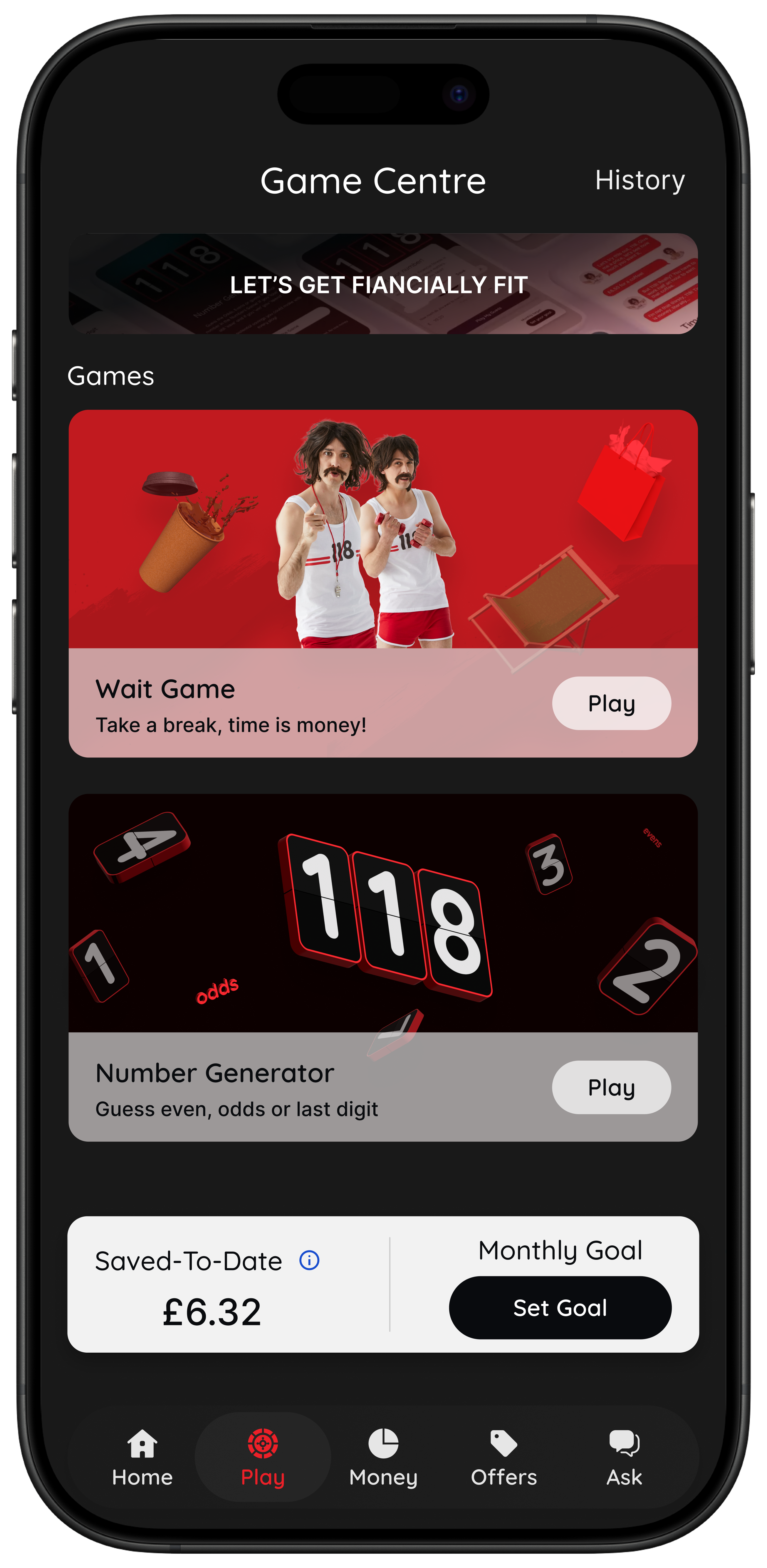
- Wait turns a price into hours worked so the cost feels personal.
- Sleep on it creates a 24-hour pause before a non-essential purchase.
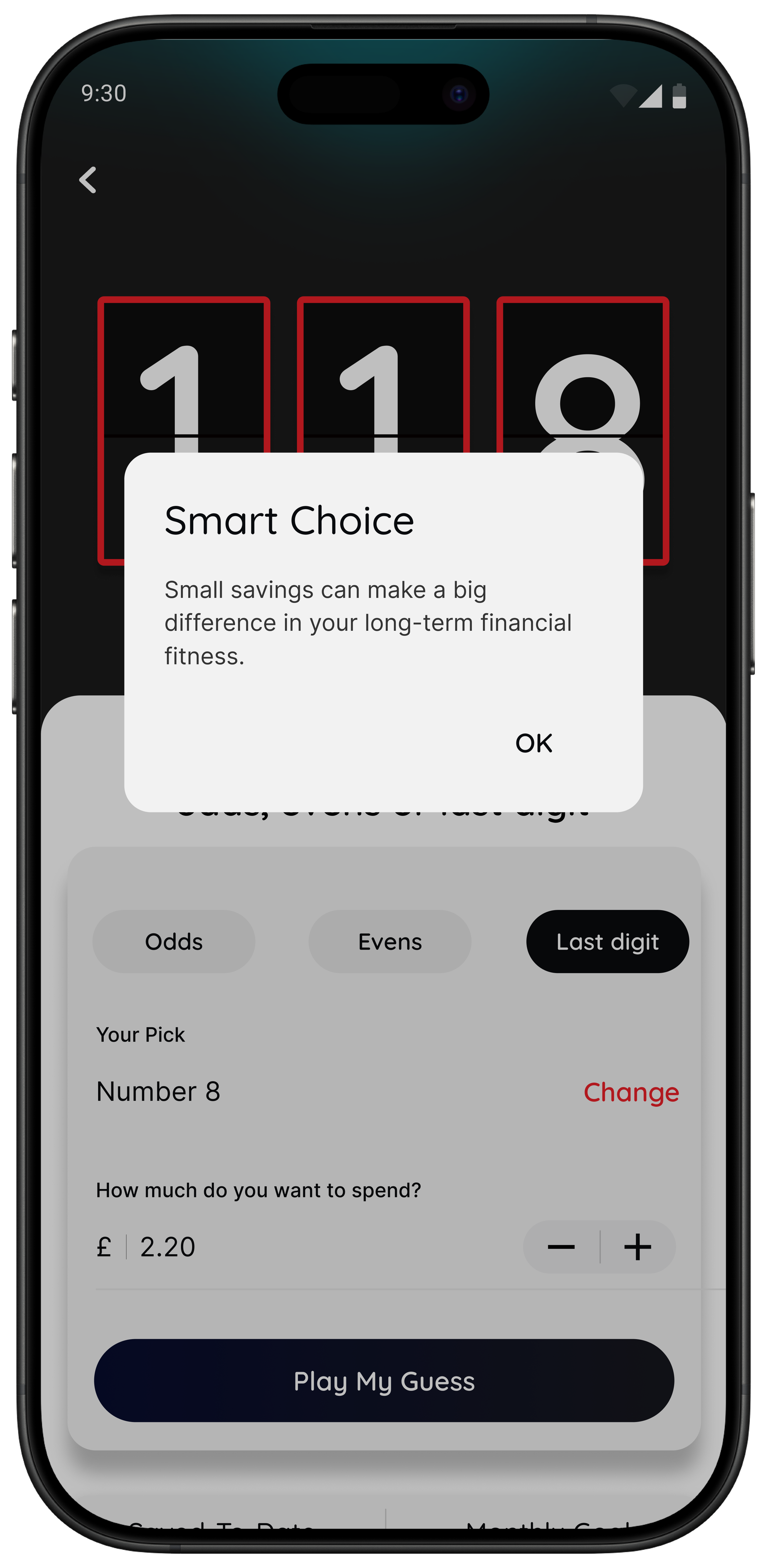
- Number Generator gives you a neutral pattern-breaker when you are stuck in buy-now mode.
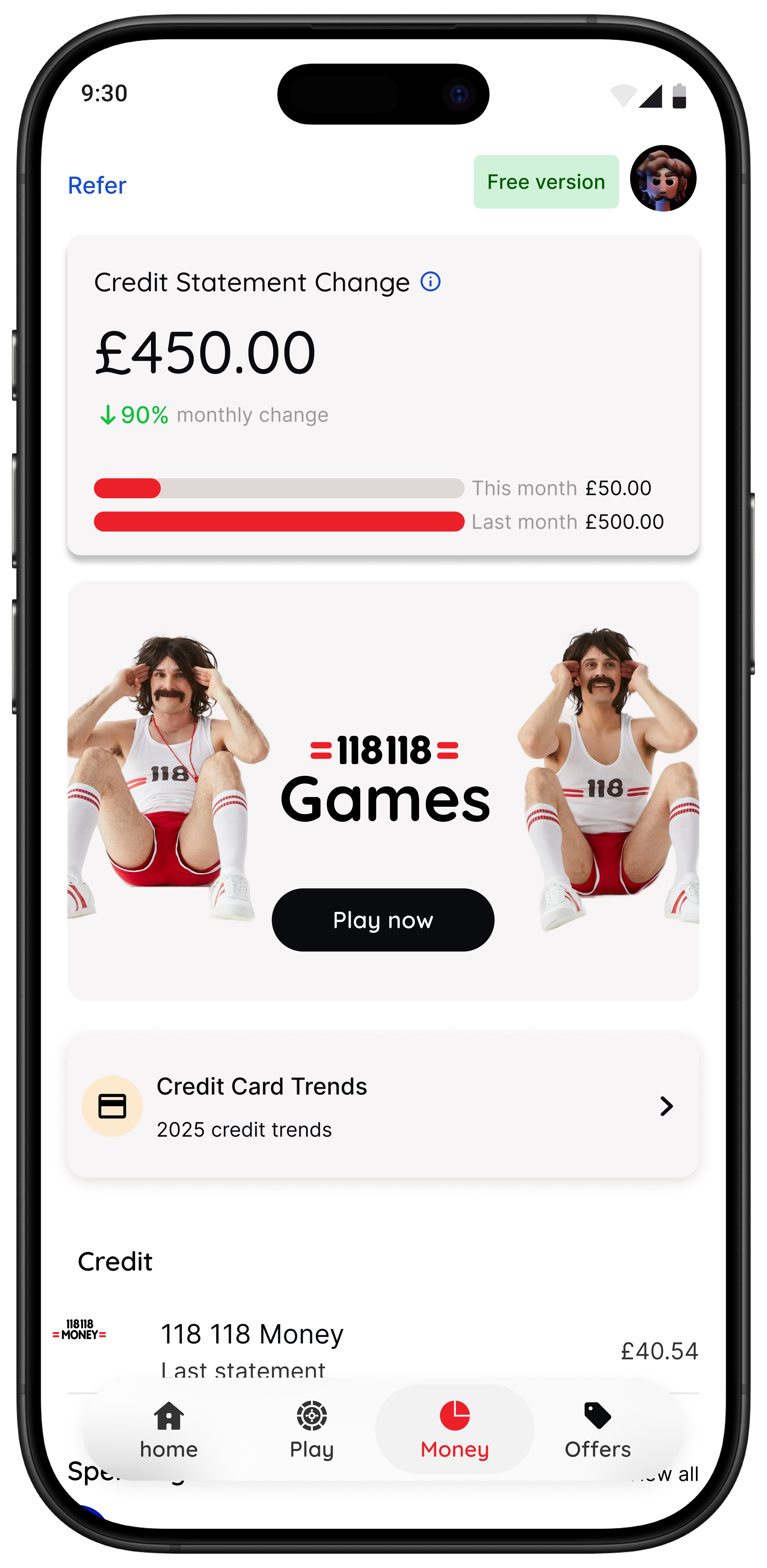
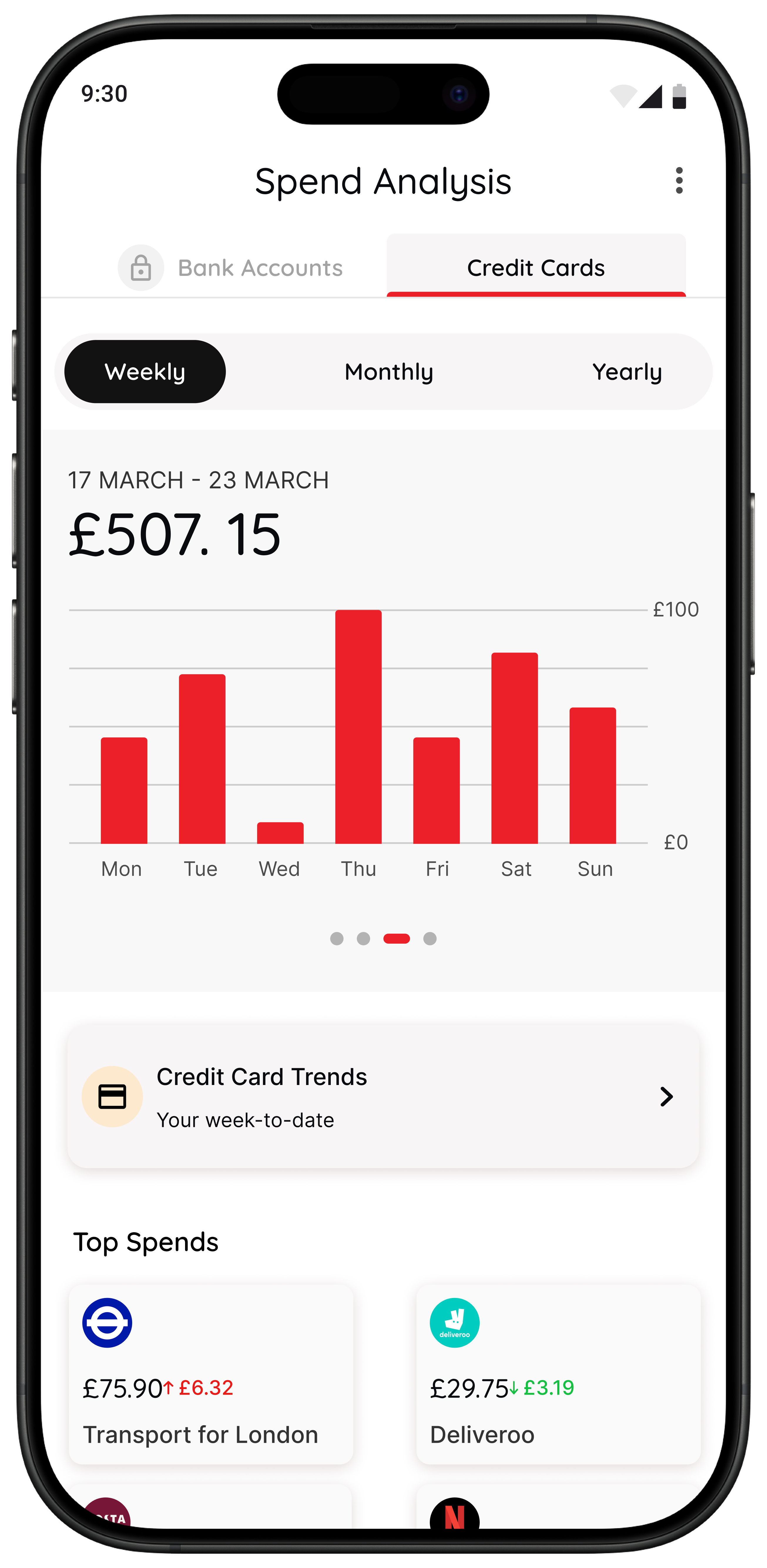
- Spending insights are available for 118 118 Money credit card customers, with broader access planned.
Best for people who do not need lectures or stricter rules. They need a simple way to interrupt autopilot.
Bottom line
Snoop is a solid UK money app for visibility, bank syncing, alerts, and everyday financial awareness. If your pain point is not knowing where your money goes, it can be a very sensible choice.
But if your real pain point is buying too quickly, under pressure, or without enough pause, then a Snoop-style dashboard may not be enough on its own. In that situation, 118M8 is the stronger option because it is built for the decision before the transaction, not only the analysis afterwards.
That is the clearest verdict from this review: Snoop helps you review your money. 118M8 helps you slow down your spending decisions.
About 118M8
A financial fitness mate for calmer spending choices
118M8 helps you build financial fitness without guilt or lectures. You can spot where your money goes, clock what a purchase really costs in hours worked, choose what matters, and pause before you buy. It is a simple companion for people who want better day-to-day spending decisions, not more pressure.
If Snoop feels strongest when you are reviewing your money, 118M8 feels strongest when you are about to spend it.
Frequently Asked Questions
Is Snoop a good app for budgeting in the UK?
Snoop is a good fit for many UK users who want account aggregation, spending analysis, bill prompts, and savings alerts in one place. It is especially useful if your main goal is visibility after transactions happen. It can be less useful if your main challenge is stopping impulse buys at the moment of purchase.
Does Snoop use open banking?
Yes. Snoop says it connects accounts through open banking so you can view balances and transactions in one place. Open banking in the UK is permission-based, and users can control which accounts they connect and revoke access later.
Is Snoop free?
Snoop offers a free app and also promotes Snoop Plus for extra features such as spending alerts, custom categories, refund tracking, reports, and net worth tools. Features and pricing can change, so it is worth checking the current app listing or Snoop Plus page before deciding.
What is the downside of Snoop?
The main downside depends on what you need. If you want help before a purchase, Snoop may feel more like a review-and-alert tool than a pause tool. It also relies on connected accounts for its core experience, which will not suit everyone.
What is a better alternative to Snoop for impulse spending?
If you mostly need help resisting impulse spending in the moment, 118M8 is usually the better fit. Its Wait, Sleep on it, and Number Generator tools are designed to slow the decision down before you spend, rather than mainly analysing transactions afterwards.